
Technology Tips for Seniors: Simple Ways to Stay Connected, Safe, and Confident

Technology has become part of everyday life. Whether it's video chatting with grandchildren, managing appointments online, reading the news, or asking a virtual assistant for help, digital tools can make life easier, safer, and more enjoyable.
Learning new technology may seem intimidating at first, but today's devices include features designed to make them more accessible than ever. With a few simple tips and the right resources, anyone can become more confident using technology.
Stay Connected
Technology makes it easier to maintain relationships, no matter where loved ones live.

Some simple ways to stay connected include:
Video calls with family and friends using Zoom, FaceTime, or Google Meet.
Sending photos through text messages or email.
Joining online community groups or interest clubs.
Participating in virtual classes or workshops.
Many organizations offer free technology training specifically for older adults. These programs provide patient, one-on-one support to help seniors build confidence at their own pace.
If you're interested in learning more about technology or attending workshops, consider checking out our sources below.
Navigating AI
Artificial Intelligence (AI) is becoming part of everyday technology, and you may already be using it without realizing it.
AI can help you:
Get answers to everyday questions.
Plan meals or create grocery lists.
Translate languages.
Organize appointments and reminders.
Learn new hobbies or skills.
Write emails or letters.
While AI is a helpful tool,it isn't always correct. Always double-check important information, especially when it relates to health, finances, or legal matters.
Remember:
AI provides suggestions, not professional advice.
Never share personal information such as banking details, passwords, or your Social Insurance Number with AI chatbots.
If something doesn't seem right, verify it using a trusted source.
Recognizing Incorrect Information Online

Not everything you see online is true. False or misleading information can spread quickly through social media, emails, and websites.
Before believing or sharing information:
Check who published it.
Look for information from trusted news organizations, government websites, or recognized organizations.
Read beyond the headline.
Compare the story with other reliable sources.
Be cautious of stories designed to create fear or outrage.
Watch for spelling mistakes, poor grammar, or unusual website addresses.
If you're unsure whether something is true, it's better not to share it until you've verified the information.
Making Technology Work for You
Modern devices include accessibility features that can make technology easier to use.
When Text Is Too Small
If reading small text has become difficult, most smartphones, tablets, and computers allow you to:
Increase text size by adjusting the font size in your device settings.
Zoom in on the screen using pinch-to-zoom gestures or accessibility settings.
Adjust brightness and contrast in the display settings. Many devices also offer Dark Mode, which can reduce eye strain.
Turn on screen readers that read text aloud.
These simple adjustments can make a big difference.
When Mobile Devices Are Hard to See
Smartphones and tablets also include features such as:
Magnifier apps that use the camera to enlarge printed text.
Larger on-screen keyboards.
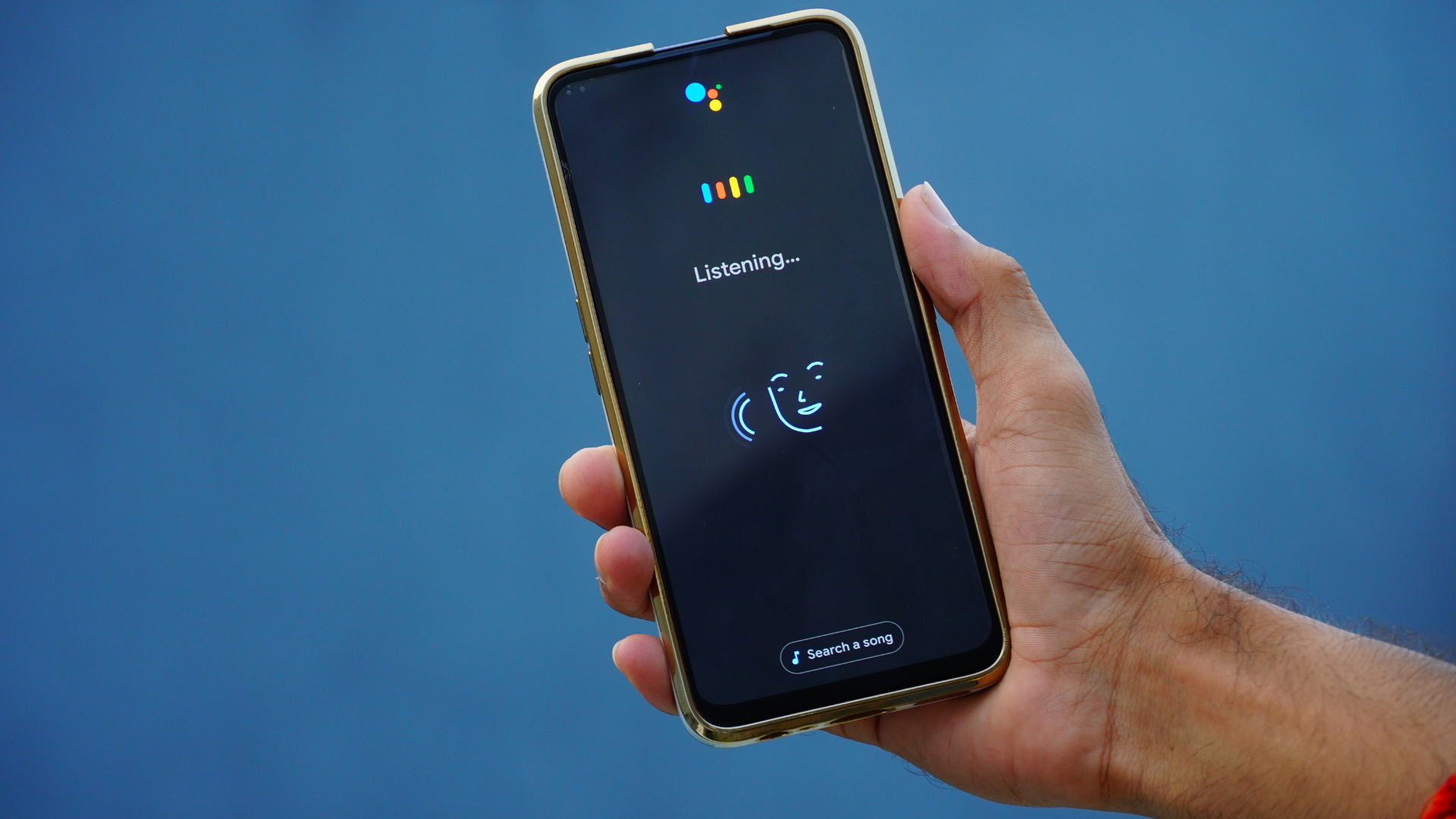
Voice assistants that allow you to make calls, send texts, or search the internet without typing. Apple devices use Siri, while Android devices use Google Assistant or Gemini. Simply say, "Hey Siri" or "Hey Google," followed by your request, such as "Send a text to Fred." If your assistant doesn't respond, you may need to enable it in your phone's settings.
Larger app icons and simplified home screens.
Taking a few minutes to apply these settings to customize your device can make everyday tasks much easier.
When Movements Are Hard
Limited hand strength or reduced dexterity doesn't have to prevent you from enjoying technology.
Helpful features include:
Voice commands instead of typing.
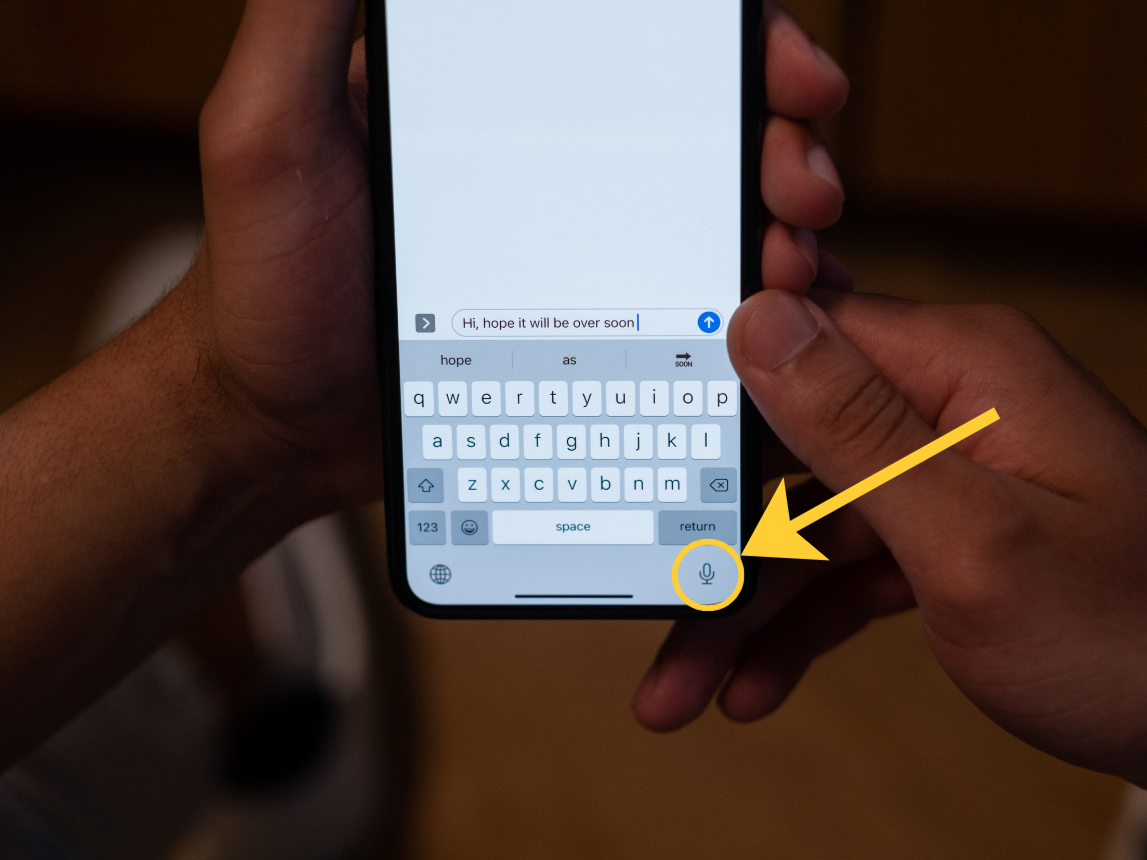
Speech-to-text for writing emails or messages. Look for the small microphone icon on or by your keyboard.
Stylus pens for easier screen navigation. Be sure to purchase one that's compatible with your device.
Adjustable touch sensitivity.
External keyboards or adaptive computer mice.
Many devices also support hands-free operation using voice assistants.
When Things Are Hard to Hear
If hearing conversations or alerts is challenging, technology can help by providing:
Closed captions during videos and video calls.
Visual notifications instead of sound alerts.
Bluetooth connections between hearing aids and smartphones.
Adjustable audio settings for clearer sound.
These features help ensure you don't miss important information.
When Technology Feels Overwhelming

You don't have to learn everything at once.
Start with one skill at a time:
Learn how to send a text.
Practise making a video call.
Explore one new app each month.
Write down the steps that work for you.
Ask questions whenever you need help.
Remember that everyone learns at a different pace. Start with one new skill, practise it regularly, and celebrate your progress. Over time, technology will become more familiar, more comfortable, and more enjoyable to use.
Stay Safe Online

Just as you lock your front door to protect your home, it's important to protect yourself online. A few simple cybersecurity habits can go a long way toward keeping your personal information safe.
Here are some easy ways to stay secure:
Create strong, unique passwords for each of your online accounts.
Be cautious of unexpected emails, text messages, or phone calls asking for personal or financial information.
Never click on suspicious links or download attachments from unknown senders.
Never allow someone claiming to be "tech support" to remotely access your computer unless you contacted the company first.
Keep your smartphone, tablet, and computer updated with the latest software and security updates.
Review your privacy settings on social media and other online accounts regularly.
Be mindful of what you share online. Personal information such as your birthday, address, vacation plans, or answers to common security questions can be valuable to scammers.
Remember, if an email, phone call, text message, or online offer seems too good to be true, it probably is. Scammers often create a sense of urgency to encourage people to act without thinking. If something seems suspicious, take a moment to verify the information by contacting the organization directly using a trusted phone number or website.
By practising a few simple safety habits and staying alert to common scams, you can enjoy technology with greater confidence and peace of mind.
You're Never Too Old to Learn

Technology is meant to make life easier, not more stressful. Whether you're learning to use a smartphone, exploring artificial intelligence, shopping online, or making your first video call, every new skill helps build confidence and independence.
There are many organizations ready to help older adults learn technology in a friendly, supportive environment. Taking advantage of these resources can open the door to greater independence, stronger social connections, and new opportunities for lifelong learning.
Technology isn't about keeping up with the latest trends; it's about finding tools that make everyday life simpler. Whether you're staying in touch with family, managing appointments, exploring new hobbies, or accessing important services, technology can help you stay connected, informed, and engaged.
The best part? You don't have to learn everything at once. One small step at a time is all it takes to build confidence and discover how technology can work for you.
Helpful Resources
If you’d like to continue learning, these organizations offer trusted information, free classes, accessibility tips, and technology support for older adults:
Nord-Bridge Seniors Center: https://nordbridgeseniors.com/virtual-programs/education-programs/
LSCO Computer Club: https://www.atg.wa.gov/internet-safety-seniors
Connected Canadians: https://www.connectedcanadians.ca/
City of Calgary – Using Technology: https://www.calgary.ca/social-services/seniors/using-technology.html
Cyber-Seniors: https://cyberseniors.org/
Seniors Tech Services Canada: https://www.seniorstechservices.ca/
Whether you're just getting started or looking to learn something new, remember that technology is a tool to help you live more independently, stay connected with the people you care about, and enjoy new experiences. Every small step builds confidence, and it's never too late to learn.
Sources
AARP. Smartphone Accessibility: Make Your Smartphone Easier to Use. Retrieved from https://www.aarp.org/personal-technology/smartphone-accessibility/
Connected Canadians. Digital Literacy and Technology Training for Older Adults. Retrieved from https://www.connectedcanadians.ca/
City of Calgary. Using Technology for Seniors. Retrieved from https://www.calgary.ca/social-services/seniors/using-technology.html
Cyber-Seniors. Technology Support and Education for Older Adults. Retrieved from https://cyberseniors.org/
NBC Select. Best Tech for Seniors (2024). Retrieved from https://www.nbcnews.com/select/shopping/best-tech-for-seniors-rcna346312
Seniors Tech Services Canada. Technology Support for Seniors. Retrieved from https://www.seniorstechservices.ca/
Sunrise Senior Living. Technology Help for Seniors. Retrieved from https://www.sunriseseniorliving.com/resources/lifestyle/technology-help-for-seniors
Verve Senior Living. Tech Safety Tips for Seniors. Retrieved from https://verveseniorliving.com/news-events-blog/tech-safety-tips-seniors/
Washington State Office of the Attorney General. Internet Safety for Seniors. Retrieved from https://www.atg.wa.gov/internet-safety-seniors